
Marketers are fervently adopting AI amidst usage directives, but keep bumping into a few of the same issues – high token costs, and inconsistent results. In this piece, we’ll tackle both.
“How are you doing this marketing analytics work in Claude without spending a billion dollars?”
We got that question — almost verbatim — in the chat during a live webinar recently, while we were pulling live attribution and pipeline reports out of Claude in real time, on stage. It’s a fair question. If you’ve tried to get an LLM to reason over your marketing and sales data before, you already know the failure mode: you export a CSV, paste it in, watch the context window fill up with raw rows, wait, and get an answer that doesn’t reconcile with what’s in your CRM anyway. Do that at the scale of a real B2B funnel and you’ll spend a fortune on tokens for a worse answer than a marketing ops analyst would give you in an afternoon.
So how were we doing it for pennies, live, with no safety net? Not by being clever with prompts. By not asking the AI to do the data engineering at all. That’s the whole story of the CaliberMind MCP Server, and it’s worth understanding properly, because the difference between “AI that reasons over your revenue data” and “AI that burns your budget guessing” isn’t the model. It’s the architecture sitting between the model and your data.
First, let’s back up.
What’s an MCP Server? And how does it compare to using software or just AI to do the same tasks?
An MCP Server is a universal connector for AI interfaces and external tools, data, and systems. You can think of MCP servers like a USB-C for AI – universally accepted. Despite its name – Model Context Protocol Server, MCP servers aren’t necessarily servers at all. They’re a standardized protocol ‘bridge’ for AI invented by Anthropic in 2024.
The problem with a lot of the AI use cases marketers are experimenting with today is that the first step is to overload the AI with data, clean it, then query it.This makes it hard to get valuable responses back without using a ton of tokens. What solutions like MCP servers try to solve for is supplying AI clients with the context they need, with a map to go with it. Rather than make the AI figure out its way around your data, a good MCP server equips it with schema and descriptions that it can use to more quickly address your queries.
What MCP actually is (and isn’t)
MCP, or the Model Context Protocol, is the plumbing that lets an AI model call out to a live service mid-conversation instead of working only from what you pasted into the prompt. Mechanically, it’s three steps:
- Wrap. An MCP server wraps a service — Slack, Notion, your CRM, your data warehouse — and exposes its functions in a format the model understands.
- Connect. You connect it, and the model can call those functions whenever the question in front of it needs them. No copy-paste required.
- Respond. The server talks to the underlying service and returns the result, which the model uses to actually answer you.
It’s modular by design: build one MCP server and it works with any AI that speaks the protocol, not just Claude, so you’re not writing a custom integration per model, per tool. It creates a clean separation of concerns: the AI handles reasoning, the server handles data access, and each side does the thing it’s actually good at. And because the transformations — the joins, the attribution math, the deduplication — happen on the server before the data ever reaches the model, you get a huge reduction in token cost. The AI isn’t processing raw tables and building pipelines in-context; it’s calling a pre-built, pre-attributed model and reasoning over the result. That’s the real answer to “how are you doing this without spending a billion dollars.” We’re not feeding Claude a warehouse. We’re feeding it an answer key.
Not all MCP servers are alike
This is where most of the vendor conversations I’ve had this year go sideways, because “we have an MCP server” gets said about three architecturally different things.
Data-Layer-as-a-Service | Bring-Your-Own-Integration | Agent-as-a-Service | |
|---|---|---|---|
Server type | Native, vendor-hosted, fully managed | A cloud provider’s warehouse MCP that your team assembles and maintains | A local wrapper around the vendor’s own agent chat API |
What the AI receives | Governed models with GTM logic, table relations, and field definitions already built in | Raw table schema only — the AI infers meaning from column headers via text-to-SQL | Finished answers from the vendor’s own agent, with no data or schema access in between |
Who does the reasoning | Your LLM, reasoning over deterministic models — every number traces back to a query | Your LLM, guessing at semantics from column names | Their agent, inside their system, metered by credits |
Setup & upkeep | Owned by the vendor | Your team: OAuth, IAM, connector admin, and ongoing query costs | You run a local wrapper with an API token |
All three are technically “MCP.” Only one of them is handing your AI a semantic layer instead of a spreadsheet.
When to reach for which: if you need production-grade, board-ready answers that reconcile against your CRM every time — attribution, pipeline, revenue — you want the governed, data-layer-as-a-service option, because someone has already done the modeling work and it doesn’t drift. If you’re prototyping, exploring a single warehouse your data team already understands, and you’re comfortable owning query costs and access management yourself, a DIY warehouse MCP can work — with real caveats, below. If you just want a chat wrapper around a tool you already trust to answer on its own — no need to see the underlying data — an agent relay is the lightest lift, but understand you’re buying their reasoning, not building your own.
The work that happens before AI can reason
Before any of this is trustworthy — governed data layer or otherwise — six things have to be true about your data, and none of them are the AI’s job:
- Ingestion and normalization. Every source pulled in and translated into a single, consistent schema.
- Identity resolution. One person and account graph across anonymous, known, and CRM-matched identities — not three different platforms with three different opinions about who a lead is.
- Deduplication. One buyer journey stays one journey. Not three disconnected platform stories that all claim credit for the same touch.
- Attribution modeling. First touch, last touch, W-shaped, time decay, or a custom model — run against the unified data, not against whatever export happened to be handy.
- Revenue joins. Marketing activity actually connected to pipeline and closed-won data in the CRM, so “influenced” means something and isn’t just a vibe.
- The payoff. Claude — or any AI — reasons over data that’s clean, unified, and semantically consistent. Your token budget stays under control because it isn’t reprocessing raw exports. And your day job stays your day job, instead of turning into full-time data janitorial work every time someone in sales wants a number.
Skip any of these and you’ve automated the process of getting a wrong answer faster.
7 MCP Server Use Cases for Marketing Analytics
Now that we’ve laid out the foundation for a good MCP server, here are 6 ways you can use an MCP server such as CaliberMind’s for marketing analytics day-to-day, based on actual Claude artifacts we use ourselves.
“What’s actually driving pipeline from paid, and where should we cut spend?”
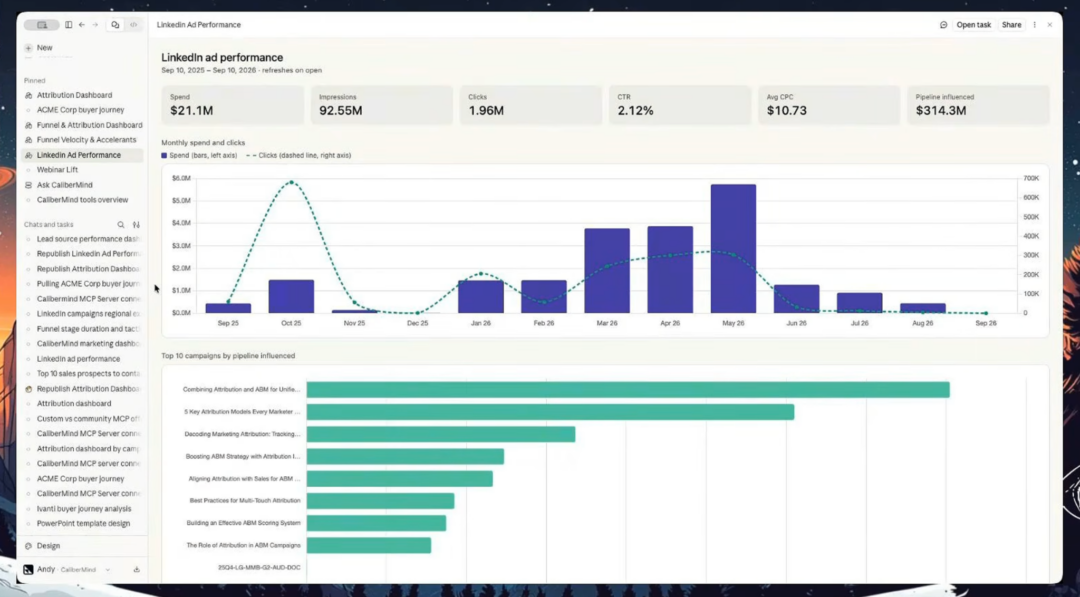
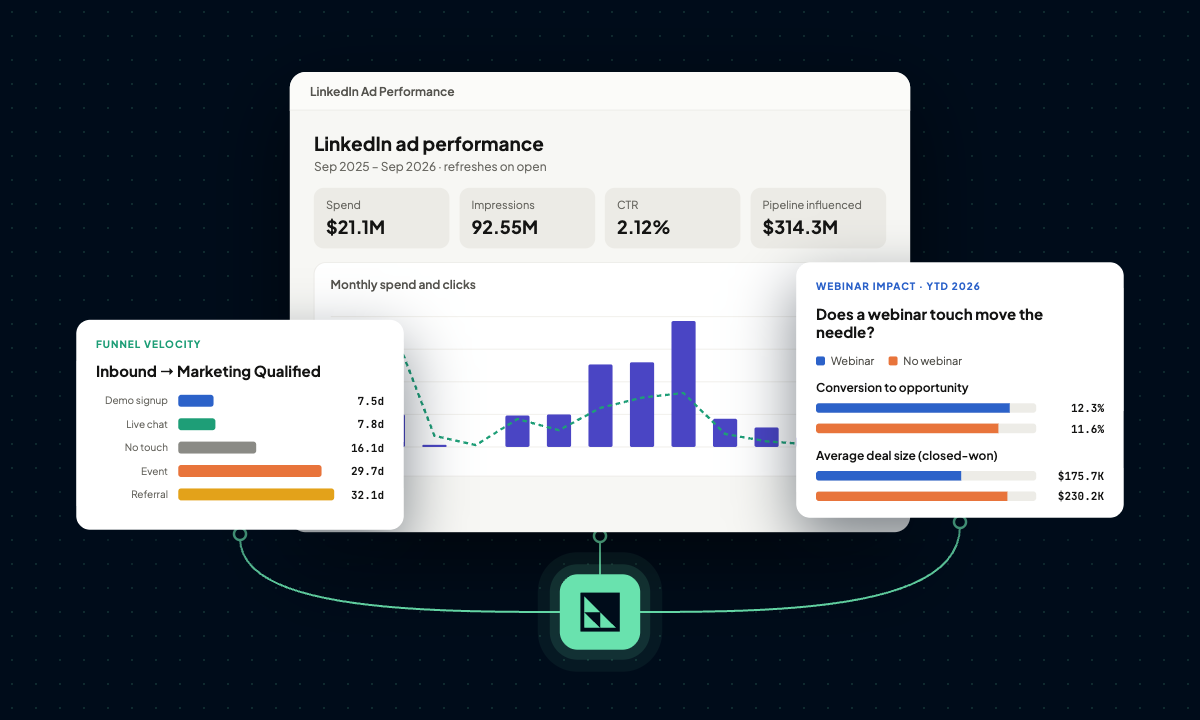
Twelve months of LinkedIn spend, joined to CRM pipeline data, ranked by what actually influenced revenue — not just what got clicks. One ask for what used to take a week of pulling exports from Ads Manager and Salesforce and reconciling them by hand.
“Which tactics actually accelerate a deal to the next stage?”
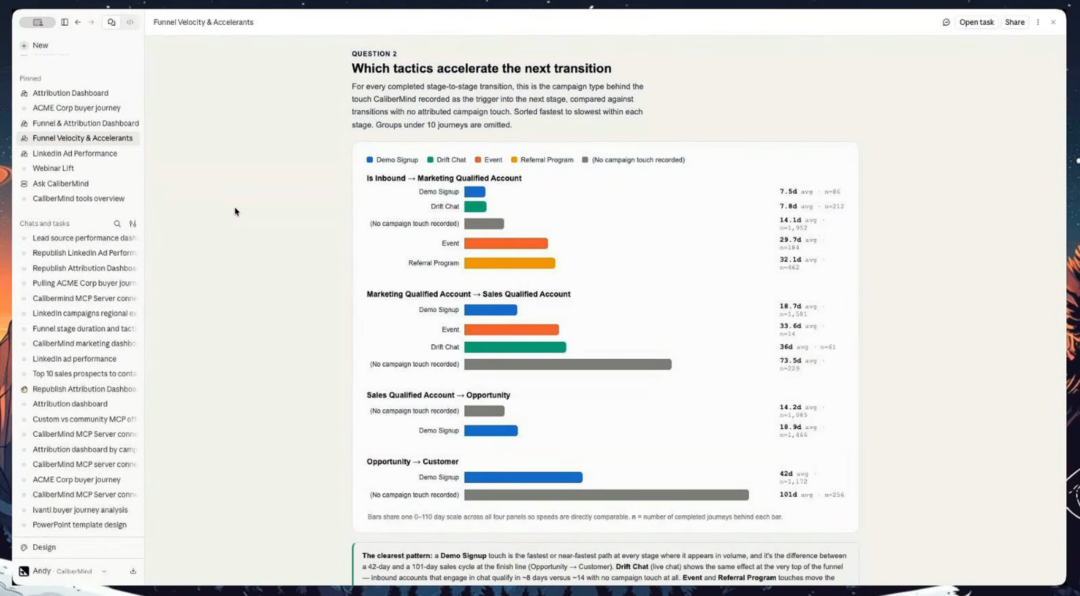
For every completed stage-to-stage transition this year, this shows the campaign type behind the touch that triggered the move to the next stage, compared against transitions with no attributed touch at all.
“Does a webinar touch actually move the needle?”
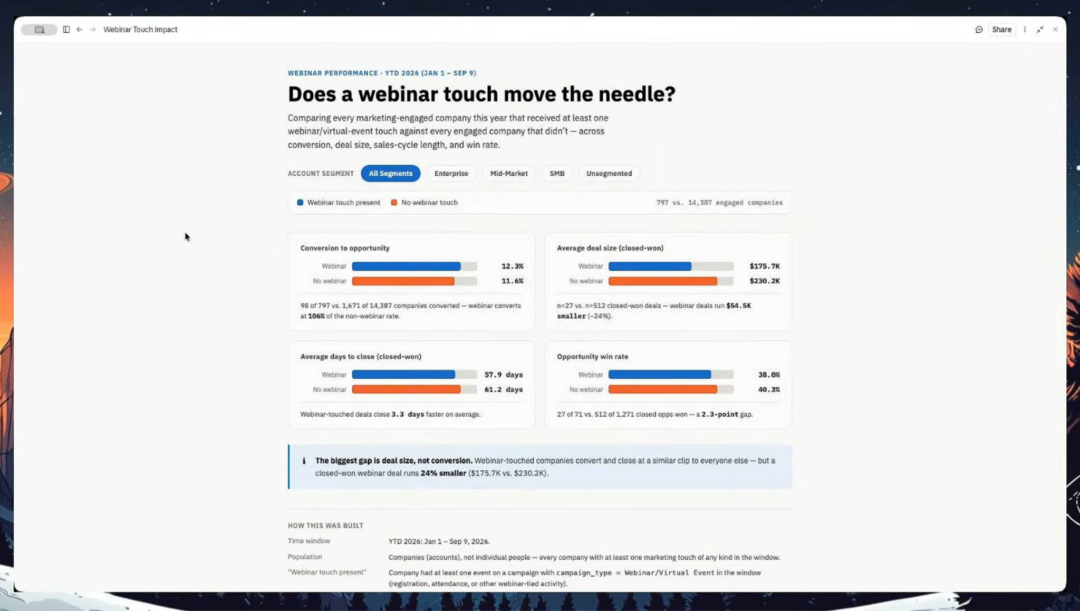
This chart using the CaliberMind MCP Server compares every marketing-engaged company this year that got a webinar touch against every engaged company that didn’t – filterable by segment, with key takeaways highlighted by Claude. Using the MCP Server, we can answer on-the-fly questions like “What are we getting out of webinars?”, with a sophisticated report that would take far more time to build manually.
Are we hitting the right accounts on LinkedIn?
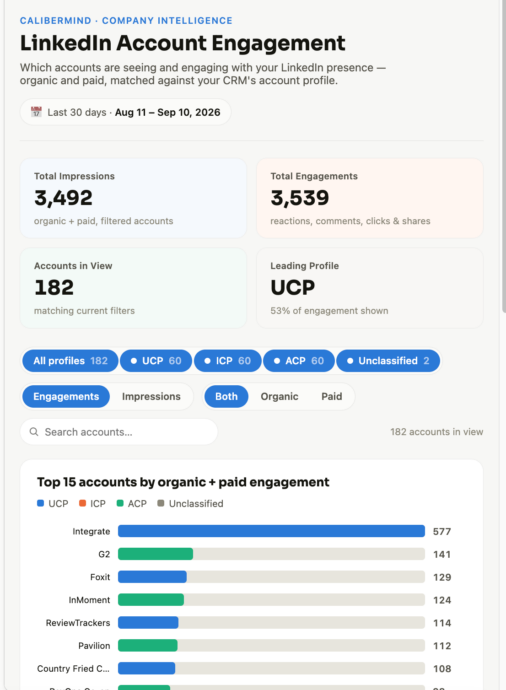
This artifact pulls in LinkedIn Company Intelligence API data to show accounts by account tier with paid or organic impressions and engagement on LinkedIn so that you can show the account influence from your LinkedIn programs that might otherwise stay completely invisible.
Account X just came inbound, what’s their buyer journey look like?
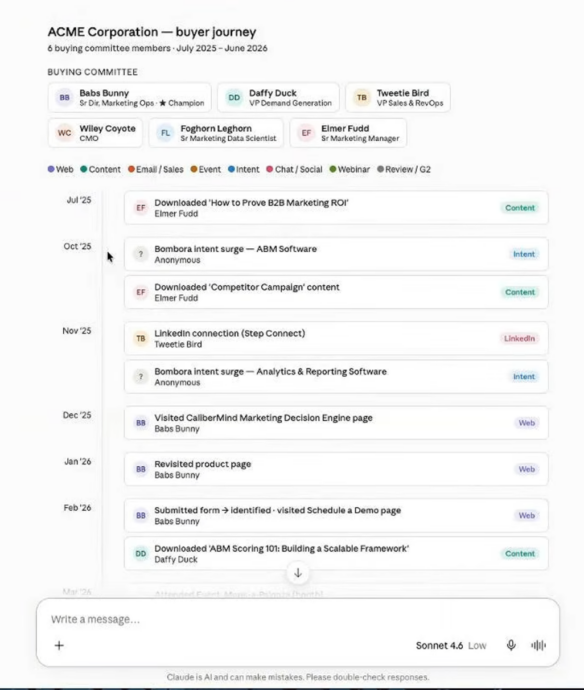
This is incredibly useful for day to day use. When an account takes a meeting, your first thought is wondering where they came from. But often, you’ll find limited evidence of that if you just go by the interactions you can track in your CRM or MAP. Here we’re referencing the touchpoints an account had across channels prior to their demo request – including ad impression/engagement data, website activity, emails, and event attendance.
Instant attribution dashboard
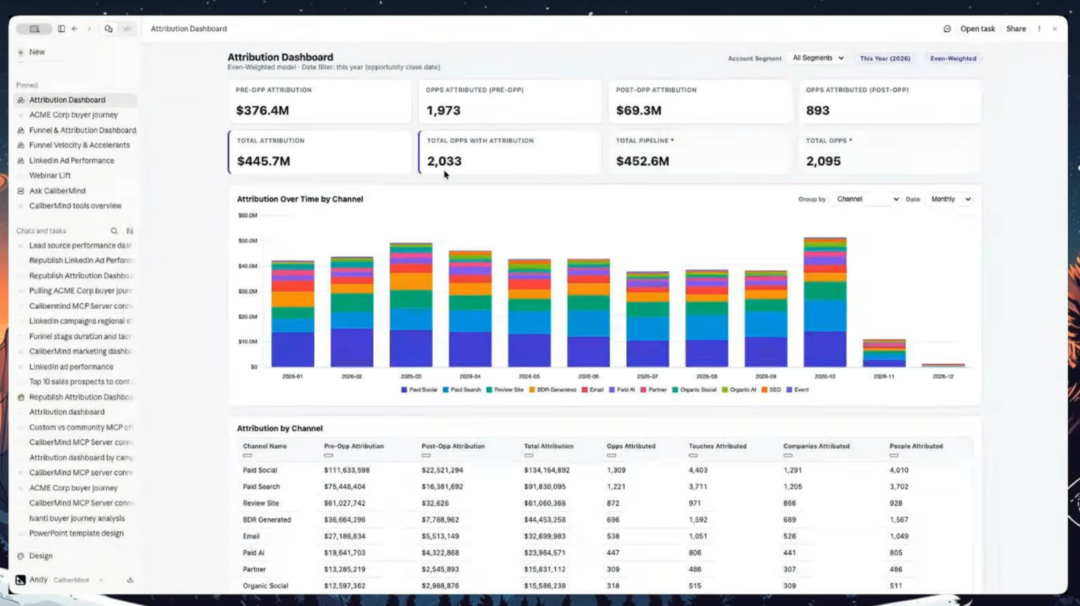
You probably need to share marketing performance reporting routinely within your marketing team, and to your executive team. With the CaliberMind MCP Server, you can build out an artifact with exactly the data you need, or schedule tasks to run when you’ll need them routinely. For example, we have a slide where we share recent demo requests and top accounts with activity on LinkedIn and our website – now I simply have a scheduled task to do the work I previously did manually – looking up the data in CaliberMind and filling out my slide deck. Now Claude does both for me.
ABM Dashboard
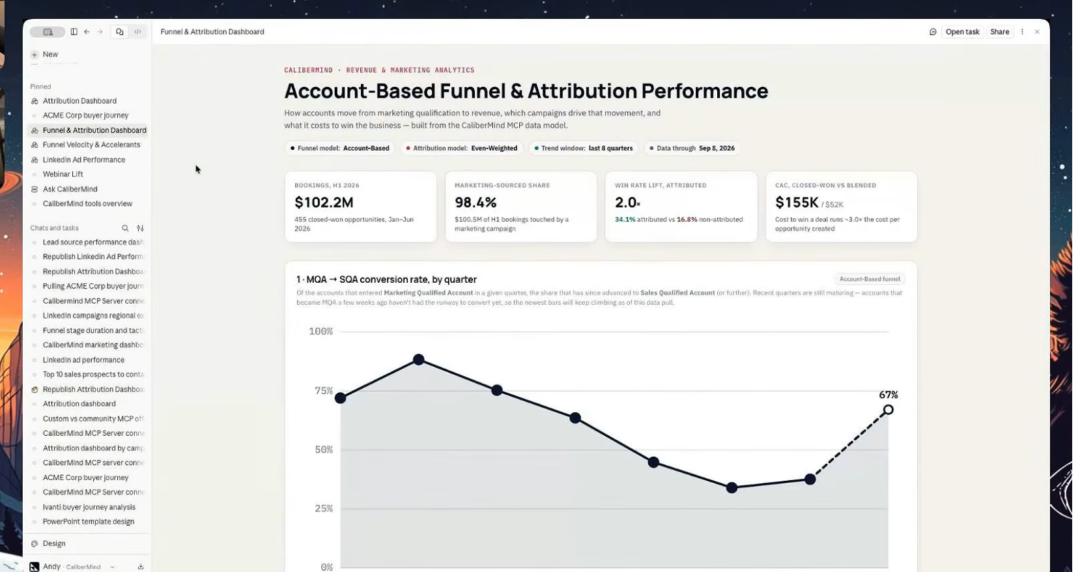
Running an ABM program? Have Claude build a dashboard with CaliberMind data that covers specific account tiers helps answer questions relevant to ABM’s performance – conversion rates, CAC, win rates, bookings, and marketing-sourced bookings.
Conclusion
So there you have it – how MCP Servers work, what a good MCP Server foundation looks like, and 7 ways you can use them day-to-day to help get you started. Want to learn more? Check out our MCP Server solution, or watch our demo of the CaliberMind MCP Server we did with Humans of Martech.